Web services and reporting impacts, with a look ahead to v30
In my Business Central v28 post, I looked at the move away from publishing pages as web services. The direction still stands: use purpose-built APIs for integrations and reporting.
The v29 SOAP and v30 OData removal notices specifically concern Microsoft pages, not every SOAP or OData service. That scope matters when deciding which connections need to change.
Fabric is the big reporting announcement: Business Central data mirroring and planned Fabric-based Power BI apps. That is separate from changing the endpoints existing reports use. I’ll cover both, along with v29’s built-in reporting improvements.
Web services: what is actually being removed?
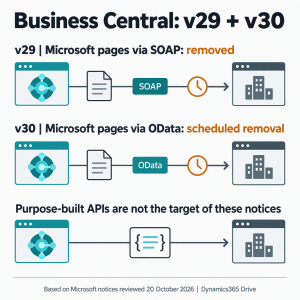
Microsoft’s platform deprecation notice sets out three separate changes:
| Timing | Published change | What it does not establish |
|---|---|---|
| v29 / October 2026 release wave | Removal of the ability to expose a Microsoft page as a SOAP endpoint. | The v29 notice does not announce a blanket removal of SOAP codeunits or other publishers’ pages. SOAP will be discontinued, but the overview gives no release number or removal date. |
| v30 / 2027 release wave 1 | Removal of the ability to expose a Microsoft page as an OData endpoint. | Not removal of all OData, REST APIs, API queries or ordinary query endpoints. |
| Future release, unspecified | General SOAP deprecation, with eventual removal announced. | No announced v29 or v30 cutoff for all remaining SOAP integrations. |
For v30, a Microsoft page is one created by an app published by Microsoft, including the Base Application, System Application and other first-party apps. Extending the page or renaming its web service does not change that ownership. Check the app publisher, not the page name or object number. This is separate from the API Overview page discussed below.
The SOAP documentation explains that publishing Microsoft UI pages over SOAP has been disabled by default since v26, with a feature-management override before v29.
Deprecated is a direction to move. Removed is a deadline. A SOAP codeunit can need migration without falling under the v29 page-removal notice.
OData is not the opposite of an API
The move towards purpose-built APIs is about using endpoints designed for integration. Business Central’s API pages and API queries also expose OData v4-enabled REST services.
The difference is the contract: UI pages change with the application, while purpose-built APIs are designed for integration.
Microsoft’s Power BI guidance recommends API pages and queries for stability and performance. This does not retire the Power BI connector, Fabric, Power Query or Excel; what matters is the endpoint they use.
A custom publisher’s UI page is outside this specific removal, but still needs maintaining. It is not automatically a good long-term API.
Fabric: the big reporting announcement
Microsoft’s Fabric mirroring guidance describes an initial snapshot and ongoing changes from selected Business Central online companies and tables to OneLake. Power BI can read that replicated data instead of repeatedly calling Business Central APIs.
Microsoft also plans single-company and multicompany versions of the standard Power BI apps using Fabric data. Power BI remains the reporting tool.
This is still prerelease documentation, with a production-ready preview planned for October 2026. Preview is not general availability or confirmation that all replacement apps are ready. Check availability, Fabric capacity, licensing, permissions and supported data.
What about the current Power BI apps?
Microsoft’s supplied Power BI apps are not Power BI itself. The current apps combine Business Central connector apps and APIs with Power BI semantic models and reports, separate from any custom reports you may have.
A final feature release would not, by itself, switch off installed reports or remove their APIs. Feature development, support dates, API availability and report refresh are different questions.
Community reading: a closer look at Fabric
For a technical look, Stefano Demiliani’s Business Central data mirroring announcement (30 September 2026) covers replication, setup and Fabric capacity. Waldo’s Business Central data in Fabric: the way it should be (1 October 2026) walks through the launch demo, setup, monitoring and planned Power BI apps.
Both were written around the announcement. Their preview observations on timing, limits and capacity are not Microsoft lifecycle commitments; check them against current documentation.
What happens to reports already in use?
- Reports reading Microsoft UI pages: plan the v30 data-source migration. A future Fabric app will not automatically repoint a report.
- The current API-based apps: the page-removal notice is not a removal of their APIs. Check app versions, published lifecycles and refresh behaviour.
- Custom or adapted reports: keep an owner for the model, calculations, permissions and maintenance. Microsoft’s Power BI apps FAQ offers downloadable PBIX source for the listed apps, not a promise of indefinite compatibility.
- A move to Fabric: reconcile measures, dimensions, company boundaries, access and refresh latency. It may need more than a URL swap.
I would not delay a necessary v30 data-source change while waiting for a Fabric app, or assume that Fabric is the right choice for every report. Different tools suit different needs. An MCP-connected agent lets you ask follow-up questions as you explore, while Power BI is great for visualising the data.
The reporting improvements in v29
Microsoft’s 29.0 release summary also lists improvements to built-in reporting:
- Financial reporting: run several reports into one PDF, trace G/L account usage, log definition changes and automate report outputs.
- Document reports: report themes, reusable headers and footers, layout lifecycle controls and an updated Word add-in with conditional visibility.
- Everyday analysis: bookmark list views and analysis tabs, and use system audit fields in analysis mode and profiles.
Default values for financial reports become mandatory, while the New Document Report Experience is optional and disabled by default. Existing layouts are not automatically replaced. Test definitions, filters, dates, totals and output before changing a live process.
For hands-on background, Silviu Virlan’s post on adding fields from related tables in analysis mode (10 June 2025) shows existing functionality and its relationship limits, not a new v29 feature or a replacement for every external reporting model.
A replacement API is not always a replacement workflow
Start with Microsoft’s documented APIs, then check what the consumer needs. A matching entity name does not guarantee a replacement for the report or integration.
| Option | Useful starting point | Check before choosing it |
|---|---|---|
| Standard API v2.0 | Business entities and documented read/write operations. | Fields, navigation, keys, filters and operations supported by that specific resource. |
| Analytics API | Read-only analytical datasets, including those used by Microsoft’s Power BI apps. | No create, update or delete operations. Reporting coverage does not replace a process that writes data. |
| Publisher-provided or custom API | A documented gap in standard coverage or a publisher-specific operation. | Ownership, permissions, versioning, business rules and ongoing support. Check standard coverage first. |
A read-only endpoint suits a dashboard, but not an automation that creates records. Check related document lines, lookup descriptions, calculated fields and custom fields too.
A report may need more than a new URL: data shapes, joins and transformations can change. Reconcile the results and test the workflow, not just the connection.
API Overview: a standard page for API discovery
Microsoft’s API Overview page, for v29 and later, lists API pages, queries and codeunits from Microsoft and installed extensions in the current environment. It has views and filters for API publisher, group and version. This is discovery, not a replacement API or an automatic migration.
I’ve built custom pages for this before, so I welcome seeing it in the standard system. It does not add missing APIs, grant permissions or prove workflow coverage.
What telemetry can tell us, and what it cannot
Telemetry shows which requests were recorded in the available window, not every dependency that might exist.
Microsoft’s incoming web-service telemetry records endpoints, service categories, object and extension details, and timings. Fields vary by request type: SOAP requests do not include the HTTP headers used to help identify callers.
- Separate production from testing. Sandbox calls do not prove a live dependency, and silence in one environment says nothing about another.
- Count requests, not business activities. Paging and navigation can turn one refresh into many requests. High call counts do not, by themselves, prove frequent polling.
- Confirm the consumer. A user agent or request pattern is a clue, not proof of which workbook or flow made the call. Check with its owner.
- Inspect navigation and writes. Following a link to another object, or submitting a batch, can make a simple top-level inventory incomplete. Do not infer all underlying operations from one outer request.
- Allow for infrequent use. Year-end reporting may be absent from the retained window. Review published services and ask owners about seasonal processes as well.
Account telemetry IDs are pseudonymous. Resolve ownership privately with an authorised administrator; do not publish the identifiers.
Also check who owns each connection. Scheduled reports and automation tied to one person’s access need a continuity plan, even if the endpoint is staying.
Edit in Excel: an open question, not a confirmed casualty
A Power Query workbook reading a published page is different from Business Central’s built-in Edit in Excel action. Open in Excel is different again: it exports data without publishing changes back.
The Excel documentation still describes refreshing and publishing through the add-in. The sources checked here do not settle how that built-in behaviour will work alongside the v30 restriction.
Test opening, refreshing, lookups and publishing changes, including error handling and permissions. A successful initial export is not an end-to-end test.
Teddy Herryanto’s Edit in Excel privacy-settings troubleshooting post (14 October 2025) explains one reason the add-in can fail today, not what happens in v30. Follow your organisation’s security policy before changing those settings.
Two finance reporting features that should not be confused
The application deprecation notice marks the Finance reports API (beta) obsolete in v29 and schedules its removal in v30. Microsoft names the Analytics API as the reporting replacement.
The Financial Report KPI Web Service is a different feature: it exposes financial-report results through a published service. Replacing the beta API does not establish equivalent coverage for every user-defined report.
If a KPI feed uses a Microsoft page, check the page-removal notice. The sources reviewed here give no specific exception or final v30 behaviour for that built-in feature. Do not treat all financial-report feeds as the beta API.
What I currently expect for v30
I would plan for the published Microsoft-page OData removal to take effect in v30. A working v29 connection is not a guarantee for the next release.
Track the page restriction, Finance reports API (beta) removal and Fabric app availability separately. The first two do not establish a Fabric delivery date or a Power BI shutdown. Once the Business Central Fabric integration is available, even in public preview, I would start small reporting migration pilots. To me, the direction is clear, but production changes should follow testing, not the announcement.
Microsoft’s April/October cadence points to April 2027 for v30, not a single update date for every environment. The online update cycle allows five calendar months, followed by grace and enforced-update stages. Check each environment’s dates and target version.
The usual preview cadence points to March 2027, subject to availability. A page working in preview does not cancel a removal notice: look for a revised announcement and retest the release build.
For v29, no observed Microsoft-page SOAP calls means no observed exposure to that removal, not a clean bill of health. Extension compatibility checks do not exercise external reports, workflows or every integration.
What I would do now
- Classify each dependency. Record the transport, object type, owning app publisher, consumer, business owner and whether it reads or writes. Include reports, workbooks, flows, warehouse feeds and external applications.
- Match it to the actual notice. Microsoft-page SOAP, Microsoft-page OData, general SOAP deprecation and the Finance reports beta API are distinct entries.
- Review custom codeunit callers. For codeunits published on the Web Services page, identify the calling tools and check for SOAP. Rework SOAP callers to use OData V4 unbound actions on the same published codeunit where supported. Test procedure compatibility and request/response handling. SOAP removal will break callers that have not migrated; there is no automatic switch. This is separate from the v29 Microsoft-page removal, and the general SOAP removal date remains unspecified.
- Check replacement coverage. Compare fields, operations and business behaviour. Use standard APIs where they fit; document gaps before commissioning custom work.
- Test before production. Use preview to explore upcoming behaviour, then exercise the released version in an updated sandbox, with a copy of production data where supported and permitted. Reconcile reports and test writes, retries and downstream results.
- Leave time for testing and fixes. Confirm owners, schedule sandbox checks before production, and allow for vendor answers. A published API is not a finished migration until its consumers have moved and been tested.
My conclusion from the v28 post stands: move integrations away from UI-page contracts. For reporting, choose between APIs and the Fabric data path based on what the report needs, then test the replacement.
Reporting and platform videos
Microsoft’s Business Central Launch Edition: What’s New in 2026 Release Wave 2 playlist on YouTube includes sessions on Fabric integration, financial reporting, document layouts and data analysis.
It is a v29, not v30 playlist. Sessions may include previews, later minor updates or future plans; check published availability.
Other changes, briefly
Outside reporting, the v29 summary includes Payables Agent matching, subcontracting and warehouse improvements, Shopify B2B and returns, sustainability tracking, Dataverse mapping and developer tools. Copilot Chat, the listed Expense Agent additions, EDI exchange and new tax features remain labelled public preview. Check availability for your licence and localisation.
- Other mandatory v29 changes: reminder-term communication texts, UI masking support and manual flushing without a required pick, plus localisation-specific items.
- .NET 10: listed in the v29 on-premises requirements. Microsoft manages the online service runtime; external integration processes have their own runtime lifecycle. .NET Framework 4.8 remains separately listed for report rendering and the Administration Shell.
- Administration: the platform notice covers PowerShell 7 administration modules for v29 and the expected v30 removal of the in-client PTE upload surface in favour of Admin Center workflows.
- Other v30 app changes: the application notices include the move from Microsoft’s AMC Fundamentals app to an AMC-owned app. They also direct older Peppol formats to BIS 3.0; the paragraph’s v29 reference conflicts with its v30 heading, so confirm the exact cutoff.
A thank-you for the MCP server
Thanks, Microsoft, for the Business Central MCP server. It has been invaluable for customers wanting their own agents to answer business questions in plain English through Microsoft Teams.
My earlier MCP post was a demo-data example. For customers, I’ve built agents tuned for CEOs and finance teams, grounded in real business data.
Tuning alone won’t keep the numbers right. Answers need authorised data, agreed calculations and figures that can be traced back to their source. If the agent can’t establish a number, it should say so.
This is not a full release catalogue. Follow Microsoft’s AI at Work roadmap for future plans, not delivery guarantees.


Leave a Reply